


The challan was real. About a week earlier, I’d received a genuine e-Challan notice from AX-VAAHAN-S. Then another SMS appeared right below it in the same conversation on my phone. It read like an update on a grievance and quoted the very same challan number.
What made me pause was the sentence saying my grievance ticket “has been” followed immediately by a link. I’d have expected a word like “closed” there. The link began with clck[.]ru and ended in ?nic[.]in. That last bit was easy to read as a government domain if you were skimming. It was part of the query string. The address still belonged to a URL shortener.

VAAHAN is the official government SMS channel I’d received the genuine notice on. TRAI requires government agencies sending bulk SMS to register the sender IDs that appear on our phones and the templates for their messages. TRAI rules for government SMS senders
That’s the part I’m still wondering about. How did a phishing message appear under the same government sender ID, with my actual challan number? I still don’t know how it was sent or how the sender got the number.
I could at least trace where the link went and report what I found. I used AI to help with the technical analysis that follows.
One link and two very different pages
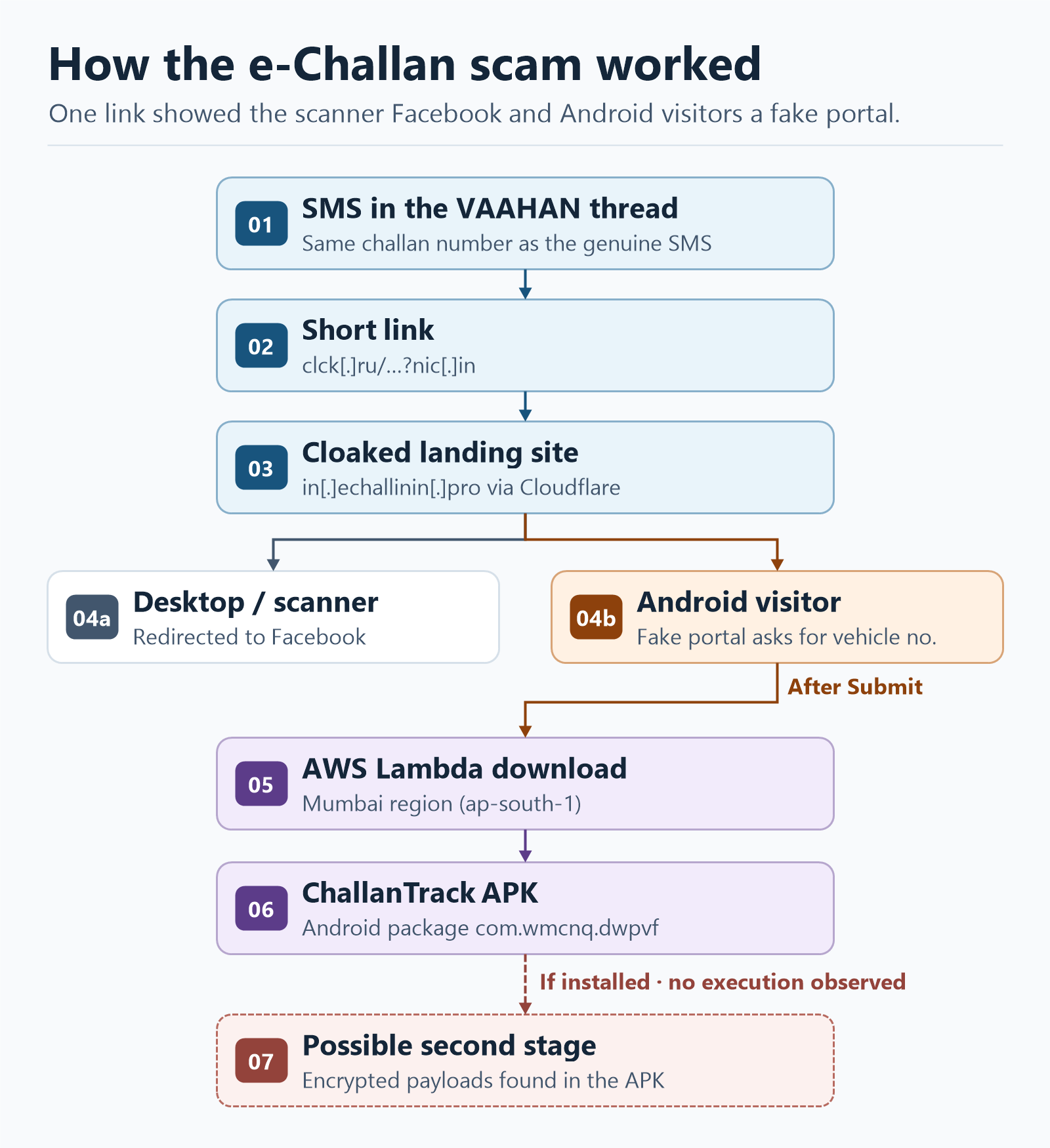
The short link led to in[.]echallinin[.]pro. Look closely at the spelling of “echallan” and the .pro ending. I looked up the destination on urlscan.io and the screenshot showed Facebook. For a moment I thought the link had gone stale.
The Android view told a different story. There was a convincing copy of the e-Challan portal, complete with the State Emblem and an NIC logo. It even carried a banner warning people about fraudulent websites (yes, on the fraudulent website!). The two views were consistent with user-agent cloaking. The site could show different content depending on what kind of browser was asking for it. In my checks, a desktop or scanner got Facebook and Android got the fake portal.
The fake form had a single field for the vehicle number and a Submit button. On the real portal, the challan lookup has additional verification. The next thing this page wanted you to do was install an Android app. Official e-Challan portal
Where the APK came from
I inspected the page as text and followed the download reference. The fake portal was the front door. The file itself, an Android installer called ChallanTrack that was roughly 11.8 MB, came from an AWS Lambda Function URL in the Mumbai region (ap-south-1). That distinction mattered when it came time to report it.
I inspected the APK on a workstation without installing or running it. The package, com.wmcnq.dwpvf, contained two encrypted files that together accounted for nearly 10 MB. I also found signs of a local VPN component and the ability to request permission to install other apps. This fits a pattern CERT-In has described in e-Challan scams. An initial app acts as a dropper, an installer that carries or retrieves more code. The encrypted files suggested a possible second stage. I had no runtime observations to establish what that stage did. CERT-In advisory on e-Challan malware
I recorded the hashes (digital fingerprints of the file) and the download metadata, then deleted my local triage folder. The APK’s SHA-256 was 24134C34C643009288FD397014666CFFC2B2531A59BAB3D1EEAB73E8AACC4A68.
What I sent to Cloudflare, AWS and CERT-In
Cloudflare got the fake portal. I reported the exact phishing URLs and explained how the Android view differed from the Facebook redirect a scanner would see. Cloudflare put a warning page in front of the reported URLs and identified the underlying hosting provider. Cloudflare phishing report
AWS got the download. I emailed the exact Lambda Function URL, its region, the UTC time I observed it, the response’s Last-Modified value and the APK’s MD5, SHA-1 and SHA-256. The timestamps identified when I’d seen the file served and the hashes identified the file I’d examined. The outcome of the AWS report remains unconfirmed. AWS abuse reporting
CERT-In got the sequence from the SMS to the APK. I sent the sender ID and short link, the two views of the phishing page, the Cloudflare edge IPs, the Lambda endpoint and the malware hashes to incident@cert-in.org.in. I specifically flagged that the suspicious SMS had appeared under the same government sender ID and carried the same challan number as the genuine notice. That gave CERT-In details it could use to coordinate with MoRTH, NIC and the telecom providers. CERT-In incident reporting

If one of these messages lands on your phone
- Check the challan directly. If you tapped the link, close the page. If it downloaded an APK, delete the file without opening it. To check the challan, open
echallan.parivahan.gov.inyourself or use your state traffic police’s official service. Official e-Challan portal - Report the message and the page. A screenshot of the SMS with the sender ID and time is a good place to start. Use Chakshu for the suspicious communication and Google Safe Browsing for the phishing page. The reporting forms don’t require you to inspect the app. Chakshu on Sanchar Saathi · Google Safe Browsing phishing report
- If you installed the APK, disconnect the phone from Wi-Fi and mobile data and remove the suspicious app. Use a trusted device to change any passwords or banking credentials you may have exposed. If money moved or you suspect financial fraud, call your bank and 1930 immediately and file a report on the National Cyber Crime Reporting Portal. CERT-In advice · National Cyber Crime Reporting Portal
The bit I keep coming back to is that ?nic[.]in at the end of the link. It took a closer look at a few characters to see where the message was really sending me. The next time I get a challan SMS, I’ll check the portal myself, familiar sender ID and all.


Leave a Reply